Get started
API Endpoint

https://keyssable.com/api
Overview:
The Keyssable API follows the principles of REST architecture with multi-tenant capabilities. Key features include:
- Tenant isolation: Every call acts only on the licenses, logs, subscribers, settings and files of your own account. A license key that belongs to another account is answered exactly like a license key that does not exist (error 60, "License key not found").
- Resource-oriented URLs: The API utilizes predictable URLs to access resources.
- GET and POST only: Most endpoints are called with GET and take their parameters in the URL. Verify License, Edit License Details, Delete DB Records, Create License (JSON) and Update User Settings use POST. Edit License Details and Delete DB Records read a form-encoded body; Create License (JSON) and Update User Settings read a JSON body.
- JSON-encoded responses: Responses from the API are encoded in JSON format (the license export is CSV).
- Read the body, not the HTTP status: Most answers, errors included, are HTTP 201. See Reading Responses.
- UTC dates: All dates are stored and returned in UTC.
- Dual authentication: The User-API-Key header identifies your account, and an API secret key in the URL authorizes the request.
User API Key Authentication:
Add the header 'User-API-Key' to every call under /api. It identifies your account. Routine Validation (/validate) needs neither the header nor a secret key: the account is found from the license key.
The User-API-Key is an account identifier, not a password: it is included in the software you distribute. On its own it only reaches Generate License Key, the product and variation lists and Subscription Management. Every endpoint that reads or changes your licenses, logs, subscribers, settings or files also needs one of your API secret keys in the URL.
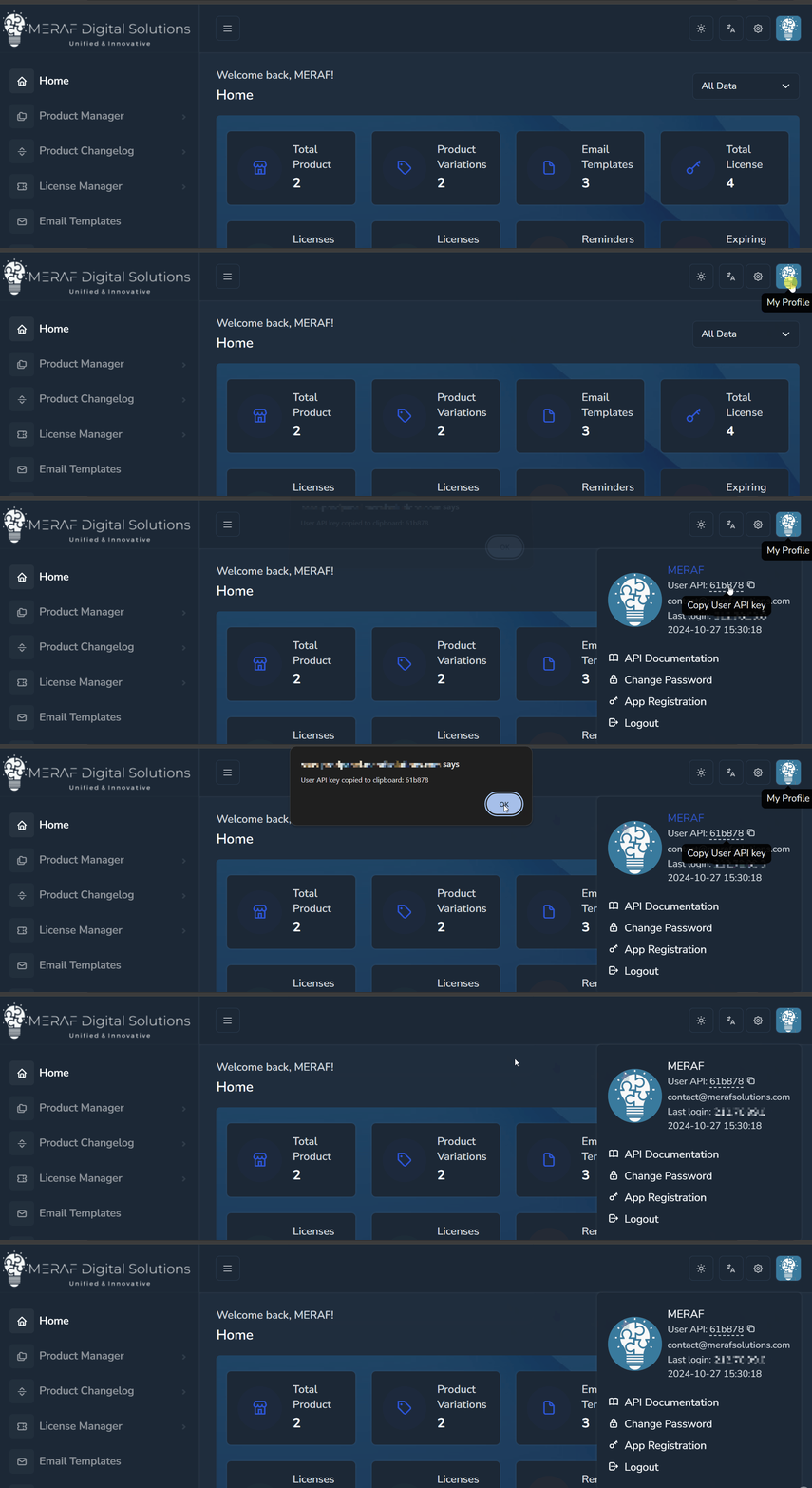
To view your unique User API key:
- Sign in to your Keyssable dashboard.
- On the top menu, click your avatar.
- Copy the User API key by clicking the underlined value.
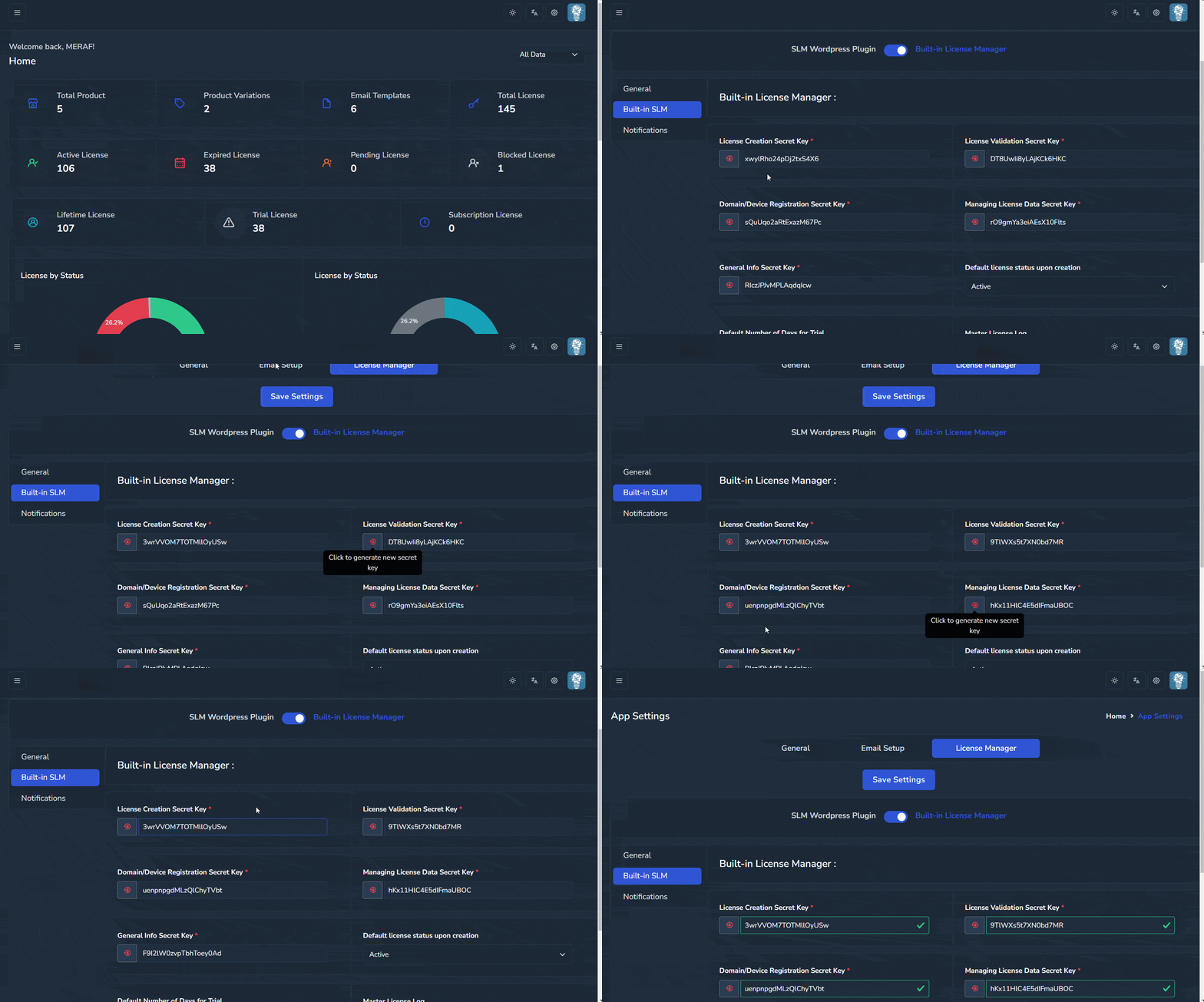
To obtain your API secret key:
- Go to the Keyssable App Settings.
- Navigate to the License Manager tab.
- Select Built-in License Manager.
- Generate Secret Keys and save them for authentication.
API Secret Key Usage:
- Creation API Secret Key: Create New License and Create License (JSON).
- Validation API Secret Key: Verify License.
- Domain/Device Registration API Secret Key: Register and Deactivate Domain or Device.
- Managing License Data API Secret Key: List, Export, Edit and Delete licenses (and delete logs/subscribers), and Update User Settings.
- General Info API Secret Key: Retrieve License Data (all 3 methods), New License Defaults, license activity logs, email subscribers, product files, product data/changelog, Dashboard Data and Read User Settings.
Only the Validation and Domain/Device Registration keys are meant for software that runs at your customers'. Keep the Creation, Managing License Data and General Info keys on your own server: never put them in browser JavaScript or in software you distribute.
Authentication errors are answered with HTTP 201:
- Missing or unknown User-API-Key:
{"result": "error", "message": "Unauthorized access", "error_code": 403} - Missing, malformed or wrong secret key:
{"result": "error", "message": "Request failed due to configuration restrictions.", "error_code": 403}
API Rate Limiting:
To ensure fair usage and maintain optimal performance, the API is rate limited per client IP address. Each group of endpoints below has its own allowance, so heavy use of one group never uses up another group's allowance:
| Limit | Endpoints |
|---|---|
| 10 / minute | Create New License, Register Domain or Device, Deactivate Domain or Device |
| 30 / minute | Edit License Details, Delete DB Records, Export License |
| 60 / minute | List License, Retrieve License Data (all 3 methods), New License Defaults, License Activity Logs, Email Subscribers, Product Files, Product Data/Changelog, Product License Defaults |
| 30 / minute | Every other endpoint under /api/: Verify License, Dashboard Data, User Settings, Create License (JSON), Subscription Management |
| 60 / minute | Routine Validation (/validate) |
| Not limited | Products, Product With Variations, Product versions, Variations, Generate License Key |
Exceeding a limit results in HTTP 429 with {"result": "error", "message": "Rate limit exceeded. Please try again later.", "code": "RATE_LIMIT_EXCEEDED", "retry_after": 60} and the headers Retry-After: 60, X-RateLimit-Limit, X-RateLimit-Remaining: 0 and X-RateLimit-Reset.
Enhanced Security Features:
Keyssable implements multiple layers of security protection beyond basic authentication:
- Timing-safe authentication: User-API-Keys and secret keys are compared in constant time.
- Encrypted key storage: Your User-API-Key and secret keys are stored encrypted with a key of your own account.
- Tenant isolation: Queries are limited to your own account's records.
- Activity logging: License operations (verify, create, edit, register, deactivate, validation checks, deletions) are written to your license activity log with the caller's IP address.
- Rate limiting: Per IP address and endpoint group (see above).
- Input validation: License fields, keys and settings are validated before they are stored.
IP Blocking and Abuse Prevention:
- Detection: An IP address that produces 5 or more failed license checks (validation, or registering or removing a domain or device) for the same license key within one minute is blocked. A wrong secret key is not counted, and neither are license changes sent to your WooCommerce store.
- Scope: A block applies to the whole platform: the IP address gets HTTP 403 on every page and every API endpoint, for every account.
- Duration: Blocks are removed automatically after about 24 hours, or earlier by the platform administrator.
Do not retry a failing request in a tight loop.
Reading Responses (HTTP Status)
Read result and error_code in the body, not the HTTP status. Most answers from the API, success or error (including the authentication errors), are sent with HTTP 201.
| HTTP status | When |
|---|---|
| 201 | Most API answers, including errors, and Routine Validation |
| 200 | Deactivate Domain or Device (success), Export License (CSV, and its "No data to export" answer), Dashboard Data, User Settings and Create License (JSON) on success |
| 400 | Create License (JSON) and Update User Settings: invalid input (the body has "code": "VALIDATION_ERROR") |
| 403 | Your IP address is blocked (applies to every page of the platform, not only the API). Create License (JSON) also uses 403 when your account has no running subscription ("code": "SUBSCRIPTION_REQUIRED") |
| 404 | No such endpoint, including a wrong method on a route that has only one (Verify License or Edit License Details called with GET, a GET-only endpoint called with POST) and an address with a missing part (for example Retrieve License by Key without the key). The body is {"result":"error","messages":"The requested resource was not found","error_code":500} (until 2026-10-01 this answer came with HTTP 500). Dashboard Data also uses 404 for "code": "USER_NOT_FOUND" |
| 405 | Delete DB Records called with GET (plain-text body "Method Not Allowed", sent after the secret key was accepted) |
| 429 | Rate limit exceeded |
| 500 | Server error (for example List License / Export License "An error occurred: ...", or "code": "INTERNAL_ERROR" from Dashboard Data, User Settings and Create License (JSON)) |
How to read an answer:
- HTTP 403 or 429: the request was stopped before it was processed (bodies below).
- If
resultis"success", the request worked. If it is"error", the reason is the number inerror_code. Exception: Dashboard Data, User Settings and Create License (JSON) give the reason as text incode, for exampleVALIDATION_ERROR. - Data endpoints (List License, Retrieve License Data, New License Defaults, activity logs, subscribers, product and variation lists, Generate License Key, Subscription Management) return the data itself on success, without a
resultfield. Their errors do have"result": "error". - Success codes are in a field named
code(Verify 200, Create New License 400, Edit 240, Create License (JSON) 200). Register returns"error_code": ""on success; Deactivate returns"error_code": 340.
NOTE: error_code 403 has two meanings. With HTTP 201 it means a missing User-API-Key or a wrong secret key. With HTTP 403 it means your IP address is blocked, and in that body the text is under messages (plural):
Missing or unknown User-API-Key (HTTP 201):

{
    "result": "error",
    "message": "Unauthorized access",
    "error_code": 403
}

Missing or wrong secret key (HTTP 201):

{
    "result": "error",
    "message": "Request failed due to configuration restrictions.",
    "error_code": 403
}

Blocked IP address (HTTP 403):

{
    "result": "error",
    "messages": "Access denied. Your IP has been temporarily blocked due to suspicious activity.",
    "error_code": 403
}

Rate limit exceeded (HTTP 429):

{
    "result": "error",
    "message": "Rate limit exceeded. Please try again later.",
    "code": "RATE_LIMIT_EXCEEDED",
    "retry_after": 60
}
Routine Validation
curl -X GET 'https://keyssable.com/validate?t={product_name}&s={license_key}&d={name}'
This routine validation checks if the queried domain or device name is registered under the provided license key. Simultaneously, it verifies the license's validity based on parameters such as status, type, expiration date, and the permitted number of registered domains and devices. WARNING: This task requires utilizing a different API endpoint and adhering to the URL format outlined in the provided guide and example.
Use case:
1. Web Applications Validation: Validates the license's validity against the active domain name of the web application.
2. Mobile and Other Applications Validation: Validates the license's validity against the currently active device.
Make a GET call to the following url (no User-API-Key and no secret key needed; the account is found from the license key):
https://keyssable.com/validate?t={product_name}&s={license_key}&d={name}
Success result example (HTTP 201) :

"1"

Error result example (HTTP 201) :

"0"

Missing t or d (HTTP 201, a number without quotes) :

0
The result is "1" only when all of these are true:
- The product exists in the license owner's product list. The product name is compared by its base name: a configured variation is removed first, so
t=AmazingAppandt=AmazingApp%20Proboth match an "AmazingApp Pro" license. The variation itself is not checked. - The license is active, and for trial and subscription licenses its expiry date is later than the start of today. A lifetime license only needs to be active.
- The license belongs to that product (same base name).
- The domain or device name
dis registered on the license: the exact name, letter case ignored (example.comdoes not matchshop.example.com).
NOTE: Accept only "1". Treat "0" and 0 as not valid. A license key that does not exist also answers "0". Any other answer (a blocked IP, a server error, a timeout) means the check could not be completed, so decide your own policy for that case. This endpoint allows 60 checks a minute per IP address (HTTP 429 beyond that), and failed checks count toward automatic IP blocking, so do not retry a failing check in a tight loop.
QUERY PARAMETERS
| Field | Type | Description |
|---|---|---|
| t | String | {product_name}: Product name the license registered to (base name, or full name with variation) |
| s | String | {license_key}: License key for validation |
| d | String | {name}: The current domain or device name's unique identification for validation with the license |
Result Logs:
Checks of an existing license are written to its license activity log, and the results are also recorded separately. These logs can be accessed as follows:
- Error Logs: View unsuccessful validation attempts.
- Success Logs: View successful validation attempts.
Both logs are available in the Keyssable dashboard and can be exported as CSV files. When "invalid checks" e-mails are enabled in your settings, an unsuccessful check also sends you an e-mail and a notification.
NOTE: The Activity Log page under License Manager is distinct from these validation logs. The License Activity log records all activities for each license key, providing a broader overview of license-related actions.
Dashboard Data
curl -H 'User-API-Key: 123abc' -X GET 'https://keyssable.com/api/dashboard-data/{secret_key}'
To retrieve your account's dashboard data (account details, all licenses, license statistics and the latest license activities), initiate a GET request using the following URL:
/dashboard-data/{secret_key}
NOTE: The General Info secret key is required.
Success result example (HTTP 200) :

{
    "result": "success",
    "data": {
        "user": {
            "id": 12,
            "username": "johndoe",
            "email": "[email protected]",
            "first_name": "John",
            "last_name": "Doe"
        },
        "licenses": [
            {
                "id": "170",
                "license_key": "VN8S8UOUH0E9YM780E3E3WR2M4CBKQBO8QGYU7TG",
                "status": "active",
                "type": "lifetime",
                "customer_email": "[email protected]",
                "product_ref": "Special Product Sample",
                "date_created": "2026-09-01 08:41:18"
            }
        ],
        "statistics": {
            "total_licenses": 25,
            "active_licenses": 18,
            "expired_licenses": 4,
            "blocked_licenses": 1,
            "pending_licenses": 2
        },
        "recent_activities": [
            {
                "license_key": "VN8S8UOUH0E9YM780E3E3WR2M4CBKQBO8QGYU7TG",
                "action": "registration: Registration of the domain (example.com) was successful",
                "source": "203.0.113.10",
                "timestamp": "2026-09-28 10:30:00"
            }
        ]
    }
}

Error result example (wrong or missing secret key, HTTP 201) :

{
    "result": "error",
    "message": "Request failed due to configuration restrictions.",
    "error_code": 403
}

Error result example (server error, HTTP 500) :

{
    "result": "error",
    "message": "An error occurred while retrieving dashboard data.",
    "code": "INTERNAL_ERROR"
}
licenses lists every license of your account (not paginated; use List License for large accounts). recent_activities holds the 10 latest license activity-log entries, where source is the caller's IP address and timestamp is UTC.
QUERY PARAMETERS
| Field | Type | Description |
|---|---|---|
| secret_key | String | Your general info secret key |
User Settings
# Read settings
curl -H 'User-API-Key: 123abc' -X GET 'https://keyssable.com/api/user/settings/{secret_key}'

# Update settings (JSON body)
curl -X POST 'https://keyssable.com/api/user/settings/{secret_key}' \
-H 'User-API-Key: 123abc' \
-H 'Content-Type: application/json' \
-d '{"defaultTimezone": "America/New_York", "defaultAllowedDomains": "2", "sendEmailNewLicense": "on"}'
To read or update your account's settings:
GET /user/settings/{secret_key} - Read settings (General Info secret key)
POST /user/settings/{secret_key} - Update settings (Managing License Data secret key)
Read returns only the non-secret settings listed below. Secret keys and the Envato token are never returned. Update takes a JSON object of setting names and values and is all-or-nothing: if any name is not in the writable list or any value breaks its rule, nothing is saved and the answer is HTTP 400.
Success result example (GET, HTTP 200) :

{
    "result": "success",
    "settings": {
        "userCompanyName": "Example Software Ltd.",
        "userCompanyAddress": "1 Example Street, Example City",
        "defaultTimezone": "Europe/Berlin",
        "defaultLocale": "en",
        "defaultTheme": "system",
        "adminName": "License Manager",
        "adminEmail": "[email protected]",
        "replyToName": "Support",
        "replyToEmail": "[email protected]",
        "bccName": "License Manager",
        "bccEmail": "[email protected]",
        "licensePrefix": "",
        "licenseSuffix": "",
        "licenseKeyCharsCount": "40",
        "default_license_status": "active",
        "defaultAllowedDomains": "1",
        "defaultAllowedDevices": "0",
        "defaultTrialDays": "3",
        "autoExpireLicenseKeys": "on",
        "numberOfHoursToRemind": "24",
        "woocommerceServerDomain": "https://shop.example.com",
        "acceptedFileExtensions": "[\"zip\",\"rar\",\"tar.gz\"]",
        "userEnvatoSyncEnabled": null,
        "selectedEmailTemplate": "default_email_template",
        "sendEmailNewLicense": "on",
        "sendEmailInvalidChecks": "on",
        "sendEmailStoreErrors": "on",
        "sendBCCtoResendLicense": "",
        "sendBCCtoLicenseClientNotifications": "",
        "sendNewDomainDeviceRegistration": "on",
        "sendUnregisteredDomainDeviceRegistration": "on",
        "sendActivationNotification": "on",
        "sendReminderNotification": "on",
        "sendExpiredNotification": "on"
    }
}

Success result example (POST, HTTP 200) :

{
    "result": "success",
    "message": "Successfully updated 3 setting(s).",
    "updated_count": 3
}

Error result example (POST, not allowed name or invalid value, HTTP 400) :

{
    "result": "error",
    "message": "No settings were updated.",
    "errors": [
        "Setting not allowed: licensePrefix",
        "Invalid value for defaultAllowedDomains"
    ],
    "code": "VALIDATION_ERROR"
}

Error result example (POST, empty or non-JSON body, HTTP 400) :

{
    "result": "error",
    "message": "No settings provided.",
    "code": "VALIDATION_ERROR"
}

Error result example (wrong or missing secret key, HTTP 201) :

{
    "result": "error",
    "message": "Request failed due to configuration restrictions.",
    "error_code": 403
}
Values are returned as stored (strings; toggles are "on" or ""). A server error is answered with HTTP 500 and "code": "INTERNAL_ERROR". If a valid update cannot be saved at all, the answer is HTTP 400 with "code": "UPDATE_FAILED"; if only some settings could not be saved, the success answer carries a warnings list.
READABLE SETTINGS (GET)
userCompanyName, userCompanyAddress, defaultTimezone, defaultLocale, defaultTheme, adminName, adminEmail, replyToName, replyToEmail, bccName, bccEmail, licensePrefix, licenseSuffix, licenseKeyCharsCount, default_license_status, defaultAllowedDomains, defaultAllowedDevices, defaultTrialDays, autoExpireLicenseKeys, numberOfHoursToRemind, woocommerceServerDomain, woocommerceStores, acceptedFileExtensions, userEnvatoSyncEnabled, selectedEmailTemplate, sendEmailNewLicense, sendEmailInvalidChecks, sendEmailStoreErrors, sendBCCtoResendLicense, sendBCCtoLicenseClientNotifications, sendNewDomainDeviceRegistration, sendUnregisteredDomainDeviceRegistration, sendActivationNotification, sendReminderNotification, sendExpiredNotification
WRITABLE SETTINGS (POST)
| Field | Type | Description |
|---|---|---|
| userCompanyName, userCompanyAddress, defaultLocale, defaultTheme, adminName, replyToName, bccName | String | Text |
| defaultTimezone | String | A timezone identifier, e.g. "UTC", "America/New_York" |
| adminEmail, replyToEmail, bccEmail | String | A valid e-mail address, or "" to clear |
| default_license_status | String | Default status for new licenses: 'pending', 'active', 'blocked' or 'expired' |
| defaultAllowedDomains, defaultAllowedDevices, defaultTrialDays, numberOfHoursToRemind, licenseKeyCharsCount | Numeric | A whole number (digits only, e.g. "2" or 2) |
| autoExpireLicenseKeys, sendEmailNewLicense, sendEmailInvalidChecks, sendEmailStoreErrors, sendBCCtoResendLicense, sendBCCtoLicenseClientNotifications, sendNewDomainDeviceRegistration, sendUnregisteredDomainDeviceRegistration, sendActivationNotification, sendReminderNotification, sendExpiredNotification | String | "on" to enable, "" to disable (JSON true is not accepted) |
| woocommerceServerDomain | String | An http:// or https:// URL, or "" to clear |
Every value is trimmed and may be at most 1000 characters. All other settings (secret keys, file paths and names, the e-mail template, upload extensions, license prefix/suffix, the license manager choice and the Envato options) cannot be changed through the API.
QUERY PARAMETERS
| Field | Type | Description |
|---|---|---|
| secret_key | String | GET: your general info secret key. POST: your managing license data secret key |
Subscription Management
# Check subscription status
curl -H 'User-API-Key: 123abc' -X GET 'https://keyssable.com/api/subscription/status'

# Get usage analytics
curl -H 'User-API-Key: 123abc' -X GET 'https://keyssable.com/api/subscription/usage'

# Check feature limits
curl -H 'User-API-Key: 123abc' -X GET 'https://keyssable.com/api/subscription/limits'
The subscription management endpoints report your account's subscription to the platform. They need only the User-API-Key (no secret key):
GET /subscription/status- Current subscription detailsGET /subscription/usage- Usage of the current monthGET /subscription/limits- Package limits and features
Subscription Status example :

{
    "subscription_id": "I-BW452GLLEP1G",
    "package_name": "Professional",
    "status": "active",
    "billing_period": "month",
    "current_period_start": "2026-09-01 00:00:00",
    "current_period_end": "2026-10-01 00:00:00",
    "next_payment_date": "2026-10-01 00:00:00",
    "amount": "29.99",
    "currency": "USD",
    "payment_method": "PayPal",
    "trial_end": null,
    "auto_renewal": true
}

Usage Analytics example :

{
    "period": "2026-09",
    "usage": {
        "products": 12,
        "products_limit": 25,
        "licenses_created": 15,
        "licenses_limit": 25,
        "api_calls": 0,
        "api_calls_limit": 10000,
        "storage_used_mb": 245.8,
        "storage_limit_mb": 1000
    },
    "daily_usage": [
        {"date": "2026-09-01", "licenses": 0, "api_calls": 0},
        {"date": "2026-09-02", "licenses": 0, "api_calls": 0}
    ]
}

Feature Limits example :

{
    "package": "Pro Producer",
    "limits": {
        "max_products": 25,
        "max_licenses": 25,
        "max_api_calls_per_month": 10000,
        "max_storage_mb": 1000,
        "features": {
            "license_management": true,
            "api_access": true,
            "email_support": true,
            "phone_support": false,
            "custom_branding": false,
            "license_prefix": true,
            "license_suffix": true,
            "envato_sync": false,
            "no_email_footer_message": true
        }
    },
    "current_usage": {
        "products": 12,
        "licenses": 15,
        "api_calls_this_month": 0,
        "storage_used_mb": 245.8
    }
}

Error result example (no active subscription) :

{
    "result": "error",
    "message": "No active subscription found",
    "error_code": 404
}

Error result example (missing or unknown User-API-Key) :

{
    "result": "error",
    "message": "User authentication required",
    "error_code": 403
}
All answers, errors included, are HTTP 201. Usage and limits are reported for an active subscription, or a cancelled one whose paid period has not ended (and was not refunded). Other errors: "Package not found" (404) and "Failed to retrieve subscription status" / "Failed to retrieve usage analytics" / "Failed to retrieve subscription limits" (500).
NOTE: What the values mean:
licenses_createdandcurrent_usage.licensesare the total number of licenses in your account (not only this month's).products/products_limit/max_products: your products and your package's product limit. Licenses are not limited;licenses_limitandmax_licensesrepeat the product limit (older name).storage_used_mbis the size of your product files;storage_limit_mb/max_storage_mbyour package's file storage (MB). 0 means unlimited.featuresare your package's features (license prefix/suffix, Envato Sync, no e-mail footer).- API calls are not counted yet:
api_calls,api_calls_this_monthand thedaily_usagecounts are always 0, and the API call limit is a fixed 10000. daily_usagehas one entry per day of the current month up to today.auto_renewalis true for an active subscription.
The limits are enforced: a new product beyond the product limit, a product file beyond the storage limit, and new licenses without a running subscription are refused. Existing licenses keep working.
List license
curl -H 'User-API-Key: 123abc' -X GET 'https://keyssable.com/api/license/all/{secret_key}'
To retrieve the complete list of licenses, irrespective of their status, type, or other attributes, initiate a GET request using the following URL:
/license/all/{secret_key}
To retrieve the list of licenses according to available filter and keyword search, initiate a GET request using the following URL:
/license/all/{secret_key}
/license/all/{secret_key}?status=active
/license/all/{secret_key}?type=lifetime
/license/all/{secret_key}?search=test
/license/all/{secret_key}?status=active&type=lifetime&search=test&start=0&length=50
Results are newest first, 10 per page by default (maximum 500). recordsTotal is the number of all licenses of your account, recordsFiltered the number matching the filters. The search term can be sent as search=term or, as DataTables does, search[value]=term; it is matched case-insensitively as "contains" against the license key, first and last name, status, type, item reference, company name, txn_id, purchase_id_, product_ref and subscr_id.
Success result example :

{
    "draw": 1,
    "recordsTotal": 5,
    "recordsFiltered": 2,
    "data": [
        {
            "id": "2",
            "owner_id": "12",
            "license_key": "0AAHB7K2P9QX4M1ZT8WE",
            "max_allowed_domains": "1",
            "max_allowed_devices": "0",
            "license_status": "active",
            "license_type": "lifetime",
            "first_name": "John",
            "last_name": "Doe",
            "email": "[email protected]",
            "item_reference": "",
            "company_name": "N/A",
            "txn_id": "2752",
            "manual_reset_count": "",
            "purchase_id_": "3CM07149U9011364X",
            "date_created": "2024-12-10 16:14:40",
            "date_activated": "2024-12-10 16:14:40",
            "date_renewed": null,
            "date_expiry": null,
            "reminder_sent": "0",
            "reminder_sent_date": null,
            "product_ref": "The special app",
            "until": "",
            "current_ver": "",
            "subscr_id": "",
            "billing_length": "",
            "billing_interval": "onetime"
        },
        {
            "id": "1",
            "owner_id": "12",
            "license_key": "AM8N7C3V6B2N9M4L1K5J",
            "max_allowed_domains": "1",
            "max_allowed_devices": "0",
            "license_status": "expired",
            "license_type": "trial",
            "first_name": "Jane",
            "last_name": "Doe",
            "email": "[email protected]",
            "item_reference": "",
            "company_name": "N/A",
            "txn_id": "2751",
            "manual_reset_count": "",
            "purchase_id_": "5TY83016K2203521L",
            "date_created": "2024-12-04 19:43:28",
            "date_activated": "2024-12-04 19:43:28",
            "date_renewed": null,
            "date_expiry": "2024-12-12 03:23:00",
            "reminder_sent": "2",
            "reminder_sent_date": "2024-12-07 19:45:02",
            "product_ref": "One great app",
            "until": "",
            "current_ver": "",
            "subscr_id": "2751",
            "billing_length": "3",
            "billing_interval": "days"
        }
    ]
}

Empty data:
{
	"draw": 1,
	"recordsTotal": 0,
	"recordsFiltered": 0,
	"data": []
}

Error result example (wrong secret key, HTTP 201) :

{
    "result": "error",
    "message": "Request failed due to configuration restrictions.",
    "error_code": 403
}

Error result example (server error, HTTP 500) :

{
    "result": "error",
    "message": "An error occurred: ...",
    "error_code": 500
}
QUERY PARAMETERS
| Field | Type | Description |
|---|---|---|
| secret_key | String | Your managing license data secret key |
OPTIONAL QUERY PARAMETERS
| Field | Type | Description |
|---|---|---|
| status | String | Filter licenses by status (active,pending,blocked,expired) |
| type | String | Filter licenses by type (trial,subscription,lifetime) |
| search | String | Search term to filter licenses (search=term or search[value]=term) |
| start | Number | Starting record for pagination (default 0) |
| length | Number | Number of records to return (default 10, maximum 500) |
| draw | Number | DataTables draw counter, returned as-is (default 1) |
Export license
curl -H 'User-API-Key: 123abc' -X GET 'https://keyssable.com/api/license/export/{secret_key}'
To export the list of licenses, irrespective of their status, type, or other attributes, initiate a GET request using the following URL:
/license/export/{secret_key}
To export the licenses according to available filter and keyword search, initiate a GET request using the following URL:
/license/export/{secret_key}
/license/export/{secret_key}?status=active
/license/export/{secret_key}?type=lifetime
/license/export/{secret_key}?search=test
/license/export/{secret_key}?status=active&type=lifetime&search=test
The answer is a CSV file download (HTTP 200) named licenses_export_YYYYmmddHHMMSS.csv containing every matching license of your account, newest first (no pagination). The filters work as in List License.
ID,License Key,Status,Type,First Name,Last Name,Email,Product,Created Date,Expiry Date
"2","0AAHB7K2P9QX4M1ZT8WE","active","lifetime","John","Genç","[email protected]","The special app","2024-12-10 16:14:40",""
"1","AM8N7C3V6B2N9M4L1K5J","expired","trial","Jane","Doe","[email protected]","One great app","2024-12-04 19:43:28","2024-12-12 03:23:00"

Empty data (HTTP 200):
{
	"result": "error",
	"message": "No data to export",
	"error_code": 204
}

Error result example (wrong secret key, HTTP 201) :

{
    "result": "error",
    "message": "Request failed due to configuration restrictions.",
    "error_code": 403
}

Error result example (server error, HTTP 500) :

{
    "result": "error",
    "message": "An error occurred during export: ...",
    "error_code": 500
}
QUERY PARAMETERS
| Field | Type | Description |
|---|---|---|
| secret_key | String | Your managing license data secret key |
OPTIONAL QUERY PARAMETERS
| Field | Type | Description |
|---|---|---|
| status | String | Filter licenses by status (active,pending,blocked,expired) |
| type | String | Filter licenses by type (trial,subscription,lifetime) |
| search | String | Search term to filter licenses (search=term or search[value]=term) |
Verify license
curl -H 'User-API-Key: 123abc' -X POST 'https://keyssable.com/api/license/verify/{secret_key}/VN8S8UOUH0E9YM780E3E3WR2M4CBKQBO8QGYU7TG'
To retrieve the details of a specific license key, execute a POST request (no body needed) using the following URL:
/license/verify/{secret_key}/{license_key}
NOTE: This endpoint accepts only POST; a GET request gets HTTP 404. It does not decide whether the license may be used: any license of your account is returned with "result": "success" and "code": 200, whatever its status or expiry date. Check status, license_type and date_expiry yourself, or use Routine Validation. A license key of another account is answered like an unknown key. The answer does not include billing_length, billing_interval or purchase_id_; use Retrieve License Data for the full record.
max_allowed_domains / max_allowed_devices of -1 mean unlimited, 0 means none (see Product License Defaults). The same holds for every endpoint that returns a license.
Success result example :

{
    "result": "success",
    "code": 200,
    "message": "License key details retrieved.",
    "owner_id": "12",
    "status": "active",
    "subscr_id": "",
    "first_name": "John",
    "last_name": "Doe",
    "company_name": "",
    "email": "[email protected]",
    "license_key": "VN8S8UOUH0E9YM780E3E3WR2M4CBKQBO8QGYU7TG",
    "license_type": "lifetime",
    "lic_type": "lifetime",
    "max_allowed_domains": "2",
    "max_allowed_devices": "1",
    "item_reference": "Special Product Sample",
    "registered_domains": [
        {
            "id": "999",
            "owner_id": "12",
            "license_key_id": "50",
            "license_key": "VN8S8UOUH0E9YM780E3E3WR2M4CBKQBO8QGYU7TG",
            "domain_name": "example.com",
            "item_reference": "Special Product Sample"
        },
        {
            "id": "1000",
            "owner_id": "12",
            "license_key_id": "50",
            "license_key": "VN8S8UOUH0E9YM780E3E3WR2M4CBKQBO8QGYU7TG",
            "domain_name": "greatdomain.com",
            "item_reference": "Special Product Sample"
        }
    ],
    "registered_devices": [
        {
            "id": "1001",
            "owner_id": "12",
            "license_key_id": "50",
            "license_key": "VN8S8UOUH0E9YM780E3E3WR2M4CBKQBO8QGYU7TG",
            "device_name": "WINusername",
            "item_reference": "Special Product Sample"
        }
    ],
    "date_created": "2026-03-27 00:00:00",
    "date_renewed": null,
    "date_expiry": null,
    "product_ref": "Special Product Sample",
    "txn_id": "UBSKC8G6NS",
    "until": "",
    "current_ver": ""
}

Error result example (license not found, or a license of another account) :

{
    "result": "error",
    "message": "License key not found",
    "error_code": 60
}

Error result example (wrong secret key) :

{
    "result": "error",
    "message": "Request failed due to configuration restrictions.",
    "error_code": 403
}
QUERY PARAMETERS
| Field | Type | Description |
|---|---|---|
| secret_key | String | Your license validation secret key |
| license_key | String | License key for validation |
Retrieve License Data (Robust - Primary Method)
curl -H 'User-API-Key: 123abc' -X GET 'https://keyssable.com/api/license/data/{secret_key}/{purchase_id}/{product_name}'
Primary method for retrieving license data with intelligent dual-field search.
/license/data/{secret_key}/{purchase_id}/{product_name}
This endpoint searches your licenses using BOTH the purchase_id_ field OR the txn_id field, making it robust for initial orders and renewals (use the order ID, or the parent order ID for renewals). For more specific searches, see the specialized endpoints below.
Success result example :

{
	"id": "170",
	"owner_id": "12",
	"license_key": "VN8S8UOUH0E9YM780E3E3WR2M4CBKQBO8QGYU7TG",
	"max_allowed_domains": "1",
	"max_allowed_devices": "0",
	"license_status": "active",
	"license_type": "subscription",
	"first_name": "John",
	"last_name": "Doe",
	"email": "[email protected]",
	"item_reference": "woocommerce",
	"company_name": "ABC Corp",
	"txn_id": "3055",
	"manual_reset_count": "",
	"purchase_id_": "88S72039A8975545M",
	"date_created": "2026-08-01 08:41:18",
	"date_activated": "2026-08-01 08:41:18",
	"date_renewed": "2026-09-01 08:41:18",
	"date_expiry": "2026-10-01 08:41:18",
	"reminder_sent": "0",
	"reminder_sent_date": null,
	"product_ref": "Special Product Sample",
	"until": "",
	"current_ver": "",
	"subscr_id": "2679",
	"billing_length": "1",
	"billing_interval": "months"
}

Error result example (no matching license) :

{
    "result": "error",
    "message": "License key not found.",
    "error_code": 204
}

Error result example (unknown product name) :

{
    "result": "error",
    "message": "Product does not exist.",
    "error_code": 500
}
On success the license record is returned as-is, without a result field; check for "result": "error" or for the presence of license_key. product_name must be exactly one of your product names as shown in the product list (base name, letter case matters; URL-encode spaces as %20). Licenses whose product_ref contains that name are searched, and the oldest match is returned.
QUERY PARAMETERS
| Field | Type | Description |
|---|---|---|
| secret_key | String | Your license general secret key |
| purchase_id | String | Purchase ID or order ID for query (matched against purchase_id_ or txn_id). For renewals, the parent order ID |
| product_name | String | Product name the license registered to (base product name) |
Retrieve License by Transaction ID
curl -H 'User-API-Key: 123abc' -X GET 'https://keyssable.com/api/license/data-by-txn/{secret_key}/{txn_id}/{product_name}'
Specifically retrieves license data using transaction ID (txn_id field) as the primary search criterion.
/license/data-by-txn/{secret_key}/{txn_id}/{product_name}
This endpoint provides more precise matching by searching ONLY the txn_id field, unlike the general /license/data endpoint which searches both purchase_id_ OR txn_id fields. The txn_id stays the same when a subscription renews.
Use cases:
- When you need to retrieve licenses specifically by their transaction ID
- When the transaction ID is distinct from the purchase ID
- When you want to avoid ambiguity in dual-field searches
Success result example :

{
	"id": "170",
	"owner_id": "12",
	"license_key": "VN8S8UOUH0E9YM780E3E3WR2M4CBKQBO8QGYU7TG",
	"max_allowed_domains": "1",
	"max_allowed_devices": "0",
	"license_status": "active",
	"license_type": "subscription",
	"first_name": "John",
	"last_name": "Doe",
	"email": "[email protected]",
	"item_reference": "woocommerce",
	"company_name": "ABC Corp",
	"txn_id": "3055",
	"manual_reset_count": "",
	"purchase_id_": "0DN48727PR697824A",
	"date_created": "2026-08-01 08:41:18",
	"date_activated": "2026-08-01 08:41:18",
	"date_renewed": "2026-09-01 08:41:18",
	"date_expiry": "2026-10-01 08:41:18",
	"reminder_sent": "0",
	"reminder_sent_date": null,
	"product_ref": "Special Product Sample",
	"until": "",
	"current_ver": "",
	"subscr_id": "2679",
	"billing_length": "1",
	"billing_interval": "months"
}

Error result examples : same as the primary method ("License key not found." / 204, "Product does not exist." / 500)
QUERY PARAMETERS
| Field | Type | Description |
|---|---|---|
| secret_key | String | Your license general secret key |
| txn_id | String | Transaction ID for query (searches ONLY txn_id field) |
| product_name | String | Product name the license registered to (base product name, as for the primary method) |
Retrieve License by License Key (Ultimate Fallback)
curl -H 'User-API-Key: 123abc' -X GET 'https://keyssable.com/api/license/data-by-key/{secret_key}/{license_key}'
Retrieves license data using ONLY the license key as the search criterion.
/license/data-by-key/{secret_key}/{license_key}
This endpoint is the most reliable retrieval method when you have the license key. It does NOT require product name, making it ideal as an ultimate fallback in cascading retrieval strategies.
Use cases:
- Subscription renewals: Retrieve existing license using stored license key from previous order
- Ultimate fallback: When other retrieval methods fail (purchase ID, transaction ID)
- Direct lookup: When you only have the license key and not the product name
- Cross-product queries: When the license key is known but product reference might vary
Cascading Fallback Strategy:
This endpoint is designed as part of a bulletproof three-tier retrieval strategy:
- ATTEMPT 1: Try /license/data with current purchase/order ID
- ATTEMPT 2: Try /license/data with parent order ID (for renewals)
- ATTEMPT 3: Try /license/data-by-key with stored license key (ULTIMATE FALLBACK)
Failed lookups are HTTP 201 too, so decide by the body (license_key present, no "result": "error"), not by the HTTP status.
Success result example :

{
	"id": "170",
	"owner_id": "12",
	"license_key": "VN8S8UOUH0E9YM780E3E3WR2M4CBKQBO8QGYU7TG",
	"max_allowed_domains": "1",
	"max_allowed_devices": "0",
	"license_status": "active",
	"license_type": "subscription",
	"first_name": "John",
	"last_name": "Doe",
	"email": "[email protected]",
	"item_reference": "woocommerce",
	"company_name": "ABC Corp",
	"txn_id": "3055",
	"manual_reset_count": "",
	"purchase_id_": "88S72039A8975545M",
	"date_created": "2026-08-01 08:41:18",
	"date_activated": "2026-08-01 08:41:18",
	"date_renewed": "2026-09-01 08:41:18",
	"date_expiry": "2026-10-01 08:41:18",
	"reminder_sent": "0",
	"reminder_sent_date": null,
	"product_ref": "Special Product Sample",
	"until": "",
	"current_ver": "",
	"subscr_id": "2679",
	"billing_length": "1",
	"billing_interval": "months"
}

Error result example (invalid license key format) :

{
	"result": "error",
	"message": "Invalid license key format.",
	"error_code": 500
}

Error result example (license not found, or a license of another account) :

{
	"result": "error",
	"message": "License key not found.",
	"error_code": 204
}
QUERY PARAMETERS
| Field | Type | Description |
|---|---|---|
| secret_key | String | Your license general secret key |
| license_key | String | License key for direct lookup (no product name required) |
NOTE: The license key format is checked before the lookup: 10 to 100 characters, letters, digits, - and _ only. Keys with your own prefix, suffix or length are accepted.
New License Defaults
curl -H 'User-API-Key: 123abc' -X GET 'https://keyssable.com/api/license/config/{secret_key}'
To retrieve the default values your account uses for new licenses, make a GET call to the following URL. The WooCommerce add-on reads its defaults here:
/license/config/{secret_key}
The first four values are your App Settings defaults. licenseDefaultsByProduct gives the defaults of each product reference (a product with its variation, as licenses carry it in product_ref): what is set in Product Manager > License Defaults, else the App Settings default. A limit of -1 means unlimited. It is an empty object ({}) while you have no products. The WooCommerce add-on (1.3.5 or later) uses it for each order item. For the same data with its source, see Product License Defaults.
Success result example :

{
	"defaultAllowedDomains": "1",
	"defaultAllowedDevices": "0",
	"defaultTrialDays": "3",
	"default_license_status": "active",
	"licenseDefaultsByProduct": {
		"AmazingApp Pro": {
			"max_allowed_domains": 1,
			"max_allowed_devices": 0,
			"license_status": "active",
			"trial_days": 3
		},
		"AmazingApp Unlimited": {
			"max_allowed_domains": -1,
			"max_allowed_devices": 0,
			"license_status": "active",
			"trial_days": 14
		}
	}
}

Error result example (wrong secret key) :

{
    "result": "error",
    "message": "Request failed due to configuration restrictions.",
    "error_code": 403
}
QUERY PARAMETERS
| Field | Type | Description |
|---|---|---|
| secret_key | String | Your general info secret key |
Create new license
curl -H 'User-API-Key: 123abc' -X GET 'https://keyssable.com/api/license/create/{secret_key}/data?license_status=active&license_type=subscription&first_name=John&last_name=Smith&email=name@domain.com&subscr_id=54&company_name=ABS%20Inc&max_allowed_domains=2&max_allowed_devices=4&billing_length=1&billing_interval=months&date_expiry=2026-10-28%2012:00:00&product_ref=Demo%20Product&txn_id=23NF6K353&purchase_id_=JGHVH865&until=4.2.3¤t_ver=3.1.5&item_reference=Direct%20Sale'
To create a new license, initiate a GET request to the following URL:
/license/create/{secret_key}/data?{field_parameters}
All fields are sent in the query string (URL-encode the values). The last path segment data is required but ignored. The license is created in your account. On success, code is 400 (LICENSE_CREATED) and message ends with the result of the new-license e-mail when that e-mail is enabled in your settings. When the product_ref has "Skip License Emails" ticked (Product Manager > License Defaults), no e-mail is sent and the message is "License successfully created. The license email is turned off for this product." Every failure has error_code 10. When a field fails its format check, message is an object listing each field, for example {"email": "Please provide a valid email address."}. license_status, max_allowed_domains, max_allowed_devices and a trial's period can be left out: they then take the defaults of the product_ref (Product Manager > License Defaults, else App Settings, else 'pending' for the status; see Product License Defaults). A value you send always wins. To create a license from a JSON body instead, see Create License (JSON).
Success result example :

{
	"result": "success",
	"message": "License successfully created. Email license details status was successful.",
	"key": "RYZ26W6E2ZGH3CZVM2OJHUE5R452Y25X5UZGQC1C",
	"code": 400
}

Error result example (product not found) :

{
	"result": "error",
	"message": "License creation failed. Value of 'product_ref' is not in the product list.",
	"error_code": 10
}

Error result example (your SaaS subscription is not running) :

{
	"result": "error",
	"message": "License creation failed. The account has no active subscription.",
	"error_code": 10
}

Error result example (active subscription without date_expiry) :

{
	"result": "error",
	"message": "License creation failed. Specify license 'date_expiry'.",
	"error_code": 10
}

Error result example (trial or subscription license without date_expiry) :

{
	"result": "error",
	"message": "Please set the expiration date for Trial and Subscription type license. Format: 2024-01-30 22:15:00",
	"error_code": 10
}

Error result example (field format) :

{
	"result": "error",
	"message": {
		"first_name": "The first name field may only contain letters, spaces, periods, and hyphens."
	},
	"error_code": 10
}
QUERY PARAMETERS
| Field | Type | Description |
|---|---|---|
| secret_key | String | Your license creation secret key |
| field_parameters | String | New license information |
FIELD PARAMETERS
| Field | Type | Description |
|---|---|---|
| license_key | String | OPTIONAL: If not provided, a license key is generated with your prefix, suffix and length settings |
| license_status | String | OPTIONAL: License status after creation. options: 'pending', 'active', 'blocked', 'expired'. Defaults to the product's status on creation (Product License Defaults), else your default license status in App Settings, else 'pending' |
| license_type | String | REQUIRED: Type of license. options: 'trial', 'subscription', 'lifetime' |
| first_name | String | REQUIRED: License user's first name (letters, spaces, periods and hyphens only; up to 32 characters) |
| last_name | String | REQUIRED: License user's last name (letters, spaces, periods and hyphens only; up to 32 characters) |
| String | REQUIRED: Client email address (up to 64 characters) | |
| subscr_id | String | OPTIONAL: The Subscriber ID (if any). Can be useful if you are using the license key with a recurring payment plan. |
| company_name | String | OPTIONAL: License user's company name (if any) |
| max_allowed_domains | Numeric | OPTIONAL: Number of domains/installs in which this license can be used: a whole number, 0 = none, -1 = unlimited. Defaults to the product's value (Product License Defaults), else App Settings |
| max_allowed_devices | Numeric | OPTIONAL: Number of devices/installs in which this license can be used: a whole number, 0 = none, -1 = unlimited. Defaults to the product's value (Product License Defaults), else App Settings |
| billing_length | Numeric | OPTIONAL: Send it for subscriptions: the number of billing_interval periods per renewal (e.g. "1", "3", "12"). Defaults to empty |
| billing_interval | String | OPTIONAL: Send it for subscriptions. Options: 'days', 'weeks', 'months', 'years' or 'onetime'. Defaults to 'days' |
| date_expiry | String | REQUIRED: If license_type = 'subscription' (ignored for 'lifetime'). For 'trial': if both date_expiry and billing_length are left out, the trial ends after the product's free-trial days (Product License Defaults, else App Settings) and billing_length / billing_interval become those days; a billing_length without date_expiry is refused. UTC, format: Y-m-d H:i:s (e.g. 2024-01-30 22:15:00). A time of 00:00 is replaced with the creation time unless item_reference is 'woocommerce'. The license_status automatically becomes expired when the date is reached (if license auto-expiry is enabled in your settings) |
| product_ref | String | REQUIRED: The product that this license gives access to. Its base name (without variation) must be one of your products |
| txn_id | String | REQUIRED: The unique transaction ID associated with this license key |
| purchase_id_ | String | REQUIRED: This is associated with the purchase ID for third party payment app or platform. |
| until | String | OPTIONAL: Until what version this product is supported (if applicable) |
| current_ver | String | OPTIONAL: What is the current version of this product |
| item_reference | String | OPTIONAL: Defaults to product_ref. Use 'woocommerce' for WooCommerce orders (dates are then stored exactly as sent, in UTC, and you get a notification) |
| store_url | String | OPTIONAL: The store the license comes from, for example https://shop.example.com/ (the WooCommerce add-on 1.3.7 and later sends it). Stored as http(s) with a trailing slash; anything else is stored as none. Changes to the license go to this store when App Settings lists it |
| manual_reset_count | numeric | OPTIONAL: The number of times this license has been manually reset by the admin (use it if you want to keep track of it). It can be helpful for the admin to keep track of manual reset counts |
Report a Store Error
curl -H 'User-API-Key: 123abc' -X POST 'https://keyssable.com/api/license/store-error/{secret_key}' \
  --data-urlencode 'reason=no_product' --data-urlencode 'txn_id=3390' --data-urlencode 'item_id=364' \
  --data-urlencode 'store_url=https://shop.example.com/' --data-urlencode 'product_ref=Demo Product – New Edition Pro' \
  --data-urlencode 'product_name=Demo Product – New Edition' --data-urlencode 'package=Pro' \
  --data-urlencode 'first_name=John' --data-urlencode 'last_name=Smith' --data-urlencode '[email protected]' \
  --data-urlencode 'license_type=subscription' --data-urlencode 'date_expiry=2026-12-28 12:00:00'
A store reports an order line it could not license because no product in your account matches the product ordered. The WooCommerce add-on 1.3.8 and later does this by itself. Send a POST request to:
/license/store-error/{secret_key}
The entry appears in License Manager > Store Errors, one per store, order and line (a repeat counts an attempt), and you get one notification and one e-mail about it. From there you can issue the license to that order line, so the customer does not need to order again. The reply's suggestion is your product reference closest to the store's product, or null. Fields named like a secret are not stored. A refused Create New License or Edit License Details request with item_reference=woocommerce is listed there too, with the store's order and line (txn_id, item_id, for a renewal renewal_order_id); its answer does not change.
Success result example :

{
	"result": "success",
	"message": "Store error recorded.",
	"suggestion": "Demo Product Pro"
}

Error result example :

{
	"result": "error",
	"message": "Store error not recorded: reason must be no_product and txn_id the order number.",
	"error_code": 10
}
QUERY PARAMETERS
| Field | Type | Description |
|---|---|---|
| secret_key | String | Your License Creation secret key (in the URL), with your User-API-Key header |
| reason | String | no_product |
| txn_id | Numeric | The order number |
| item_id | Numeric | OPTIONAL: The order line |
| store_url | String | OPTIONAL: The store's address, for example https://shop.example.com/ |
| product_ref, product_name, package | String | OPTIONAL: The name the store looked for, and its product name and package |
| first_name, last_name, email, license_type, date_expiry, … | String | OPTIONAL: The license the line would have had, as Create New License takes it (date_expiry in UTC); used to fill the form when you issue the license |
Create License (JSON)
curl -X POST 'https://keyssable.com/api/user/licenses/{secret_key}' \
-H 'User-API-Key: 123abc' \
-H 'Content-Type: application/json' \
-d '{"license_type": "subscription", "license_status": "active", "first_name": "John", "last_name": "Doe", "email": "[email protected]", "max_allowed_domains": 2, "max_allowed_devices": 0, "product_ref": "Demo Product", "billing_length": "1", "billing_interval": "months", "date_expiry": "2026-10-28 12:00:00", "txn_id": "23NF6K353", "purchase_id_": "JGHVH865"}'
To create a license from a JSON body, initiate a POST request to the following URL with your license creation secret key:
/user/licenses/{secret_key}
The same product and billing checks as Create New License apply. Differences: the answers use real HTTP status codes (200, 400, 403, 500) and a text code; date_expiry is always taken as UTC as sent; no new-license e-mail is sent. Without a running subscription: HTTP 403 with "code": "SUBSCRIPTION_REQUIRED".
Success result example (HTTP 200) :

{
	"result": "success",
	"message": "License created successfully.",
	"license_key": "RYZ26W6E2ZGH3CZVM2OJHUE5R452Y25X5UZGQC1C",
	"code": 200
}

Error result example (missing field, HTTP 400) :

{
	"result": "error",
	"message": "Required field missing: product_ref",
	"code": "VALIDATION_ERROR"
}

Error result example (product not found, HTTP 400) :

{
	"result": "error",
	"message": "License creation failed: The submitted product is not in the product list.",
	"code": "VALIDATION_ERROR"
}

Error result example (active subscription without date_expiry, HTTP 400) :

{
	"result": "error",
	"message": "License creation failed: Expiration date is required for subscription license type",
	"code": "VALIDATION_ERROR"
}

Error result example (field format, HTTP 400) :

{
	"result": "error",
	"message": {
		"email": "The email field must contain a valid email address."
	},
	"code": "VALIDATION_ERROR"
}

Error result example (not saved, HTTP 500) :

{
	"result": "error",
	"message": "Failed to create license.",
	"code": "CREATE_FAILED"
}
Other HTTP 400 messages: "Send the license fields as a JSON object." and "Invalid date_expiry. Use Y-m-d H:i:s (UTC).". A server error is HTTP 500 with "code": "INTERNAL_ERROR".
QUERY PARAMETERS
| Field | Type | Description |
|---|---|---|
| secret_key | String | Your license creation secret key |
JSON FIELDS
| Field | Type | Description |
|---|---|---|
| license_type | String | REQUIRED: 'trial', 'subscription' or 'lifetime' |
| license_status | String | OPTIONAL: 'pending', 'active', 'blocked' or 'expired'. Defaults to the product's status on creation (Product License Defaults), else App Settings |
| first_name, last_name | String | REQUIRED: Letters, spaces, periods and hyphens only; up to 32 characters |
| String | REQUIRED: Client email address (up to 64 characters) | |
| max_allowed_domains, max_allowed_devices | Numeric | OPTIONAL: Whole numbers, 0 = none, -1 = unlimited (anything else: HTTP 400). Default to the product's values (Product License Defaults), else App Settings |
| product_ref | String | REQUIRED: Its base name (without variation) must be one of your products |
| license_key | String | OPTIONAL: 10 to 100 letters, digits, '-' or '_'. Generated when omitted |
| date_expiry | String | OPTIONAL: UTC, Y-m-d H:i:s. Required for an active 'subscription' license; ignored for 'lifetime'. A 'trial' without date_expiry and billing_length ends after the product's free-trial days |
| billing_length, billing_interval | String | OPTIONAL: As in Create New License (billing_interval defaults to 'days'; for 'lifetime' they become '' and 'onetime') |
| txn_id, purchase_id_ | String | OPTIONAL: Default to 'API-' followed by the current Unix time |
| item_reference | String | OPTIONAL: Defaults to product_ref |
| store_url | String | OPTIONAL: The store the license comes from, as in License Creation. This endpoint sends no license e-mail |
| company_name, subscr_id, current_ver, until | String | OPTIONAL: Default to '' |
Edit License Details
curl -X POST 'https://keyssable.com/api/license/edit/{secret_key}' \
-H 'User-API-Key: 123abc' \
-H 'Content-Type: application/x-www-form-urlencoded' \
-d 'license_key=VN8S8UOUH0E9YM780E3E3WR2M4CBKQBO8QGYU7TG&license_status=active&license_type=trial&first_name=John&last_name=Doe&email=otheruser@example.com&subscr_id=54&company_name=ABS%20Inc&max_allowed_domains=1&max_allowed_devices=0&billing_length=3&billing_interval=days&date_expiry=2026-10-02%2010:01:00&product_ref=Demo%20Product&txn_id=23NF6K353&purchase_id_=JGHVH865&until=4.2.3¤t_ver=3.1.5&item_reference=Direct%20Sale'
To edit/modify the license details, initiate a POST request to the following URL:
/license/edit/{secret_key}
NOTE:
- The body must be form-encoded (
application/x-www-form-urlencodedormultipart/form-data). JSON bodies are not read. A GET request gets HTTP 404. - Send the complete license record (all REQUIRED fields below), not only the fields you change.
license_keyidentifies the license and cannot be changed.owner_id,id,date_createdanddate_activatedare ignored. - Only licenses of your own account can be edited; any other license key answers "License key not found".
- Setting
license_typeto lifetime clearsbilling_lengthanddate_expiryand setsbilling_intervalto onetime; an emptyitem_referencethen becomes product_ref. - On success,
codeis 240. Every failure haserror_code220. A missing required field is named, for example "License detail update failed. Missing required parameter: license_type". If the license came from WooCommerce (item_reference'woocommerce'), the WooCommerce order is updated too; a problem there does not change this answer.
Success result example :

{
	"result": "success",
	"message": "License details successfully updated.",
	"key": "VN8S8UOUH0E9YM780E3E3WR2M4CBKQBO8QGYU7TG",
	"code": 240
}

Error result example (missing required parameter) :

{
	"result": "error",
	"message": "License detail update failed. Missing required parameter: license_type",
	"error_code": 220
}

Error result example (license not found, or a license of another account) :

{
	"result": "error",
	"message": "License key not found",
	"error_code": 220
}

Error result example (product not found) :

{
	"result": "error",
	"message": "License detail update failed. Value of 'product_ref' is not in the product list.",
	"error_code": 220
}
Other messages (all error_code 220): "License detail update failed. The license key is required to proceed with the request." (no license_key), "License detail update failed. Specify license 'billing_length'." / "... 'billing_interval'." (trial or subscription without them), "License detail update failed. Specify license 'date_expiry'." (active subscription) / "License detail update failed. Specify license length 'date_expiry'." (active trial), "Please set the expiration date for Trial and Subscription type license. Format: 2024-01-30 22:15:00" (empty date_expiry), an object of field messages (format checks) and "License details update failed due to server error.".
QUERY PARAMETERS
| Field | Type | Description |
|---|---|---|
| secret_key | String | Your managing license data secret key |
FIELD PARAMETERS
| Field | Type | Description |
|---|---|---|
| license_key | String | REQUIRED: License key for editing the data |
| license_status | String | REQUIRED: License status. options: 'pending', 'active', 'blocked', 'expired' |
| license_type | String | REQUIRED: Type of license. options: 'trial', 'subscription', 'lifetime' |
| first_name | String | REQUIRED: License user's first name (letters, spaces, periods and hyphens only) |
| last_name | String | REQUIRED: License user's last name (letters, spaces, periods and hyphens only) |
| String | REQUIRED: Client email address | |
| subscr_id | String | OPTIONAL: The Subscriber ID (if any). Can be useful if you are using the license key with a recurring payment plan. |
| company_name | String | OPTIONAL: License user's company name (if any) |
| max_allowed_domains | Numeric | REQUIRED: Number of domains/installs in which this license can be used: a whole number, 0 = none, -1 = unlimited |
| max_allowed_devices | Numeric | REQUIRED: Number of devices/installs in which this license can be used: a whole number, 0 = none, -1 = unlimited |
| billing_length | Numeric | REQUIRED: If license_type = 'subscription' or 'trial'. The number of billing_interval periods per renewal (e.g. "1", "3", "12") |
| billing_interval | String | REQUIRED: If license_type = 'subscription' or 'trial'. Options: 'days', 'weeks', 'months', 'years' or 'onetime' |
| date_expiry | String | REQUIRED: If license_type = 'subscription' or 'trial'. Format: Y-m-d H:i:s (e.g. 2024-01-30 22:15:00). Taken as UTC when item_reference is 'woocommerce'; otherwise taken as local time in your default timezone (App Settings) and converted to UTC |
| product_ref | String | REQUIRED: The product that this license gives access to. Its base name (without variation) must be one of your products |
| txn_id | String | REQUIRED: The unique transaction ID associated with this license key |
| purchase_id_ | String | REQUIRED: This is associated with the purchase ID for third party payment app or platform. |
| until | String | OPTIONAL: Until what version this product is supported (if applicable) |
| current_ver | String | OPTIONAL: What is the current version of this product |
| item_reference | String | OPTIONAL: For 'lifetime' licenses an empty or missing value becomes product_ref. 'woocommerce' means date_expiry is UTC and the WooCommerce order is updated after the edit |
| store_url | String | OPTIONAL: A valid store address replaces the license's store; an empty or invalid one keeps it. The WooCommerce order is updated in the license's own store when App Settings lists it, else in the product's Store (License Defaults), else in your WooCommerce domain |
| manual_reset_count | numeric | OPTIONAL: The number of times this license has been manually reset by the admin (use it if you want to keep track of it). It can be helpful for the admin to keep track of manual reset counts |
Register domain/device to a license
curl -H 'User-API-Key: 123abc' -X GET 'https://keyssable.com/api/license/register/domain/sampledomain.com/{secret_key}/a16da9b45ff3e8c63579e8c42457393dfa70d798'
curl -H 'User-API-Key: 123abc' -X GET 'https://keyssable.com/api/license/register/device/XYZ-Android/{secret_key}/a16da9b45ff3e8c63579e8c42457393dfa70d798'
To register a domain or device name to a license, make a GET call to the following URL:
/license/register/{type}/{name}/{secret_key}/{license_key}
NOTE: By default, if a trial license has already registered a domain or device, and another trial license of the same product attempts to register the same domain or device, the registration fails when the two licenses were created less than 7 days apart. This restriction is in place to prevent potential abuse by creating multiple trial licenses for the same product using the same domain or device.
Success result example :

{
	"result": "success",
	"message": "Registration of the domain (merafic.test) was successful",
	"error_code": ""
}

Already registered (also a success) :

{
	"result": "success",
	"message": "Domain (merafic.test) is already registered under the license",
	"error_code": ""
}

Error result example :

{
	"result": "error",
	"message": "The allowed limit for registered domain has been reached",
	"error_code": 50
}
All answers are HTTP 201. The checks run in this order:
| Case | result | error_code |
|---|---|---|
| Missing or unknown User-API-Key: "Unauthorized access"; wrong secret key: "Request failed due to configuration restrictions." | error | 403 |
| Type is not 'domain' or 'device': "Received request is not existing. Please check query type and try again" | error | 500 |
| License not found, or a license of another account: "License key not found." | error | 60 |
| License is not active: "Unable to process request as the license status is not active" | error | 60 |
| Already registered | success | "" (empty) |
| Limit reached: "The allowed limit for registered domain has been reached" (never for a license whose max_allowed_domains / max_allowed_devices is -1: unlimited) | error | 50 (domains) / 120 (devices) |
| Same domain/device used before by another trial license (see note): "The same domain has been registered previously with a trial license key." | error | 60 |
| Registered | success | "" (empty) |
| Problem while saving: "License registration error: ..." | error | 503 |
"Registered" and "already registered" differ only in the message. Names are matched exactly on this license (letter case ignored): example.com and shop.example.com are different registrations. When your package includes Envato Sync and Envato sync is enabled in your App Settings (with an Envato API token), an Envato purchase code that is not a license yet is verified with Envato; if it is a sale of one of your products, it becomes a lifetime license before the domain or device is registered. Otherwise it is answered "License key not found." (60).
QUERY PARAMETERS
| Field | Type | Description |
|---|---|---|
| type | String | 'domain' or 'device' |
| name | String | Domain or device name's unique identification |
| secret_key | String | Your domain/device registration secret key |
| license_key | String | The license key (or an Envato purchase code, see above) |
Deactivate domain/device from a license
curl -H 'User-API-Key: 123abc' -X GET 'https://keyssable.com/api/license/unregister/domain/sampledomain.com/{secret_key}/a16da9b45ff3e8c63579e8c42457393dfa70d798'
curl -H 'User-API-Key: 123abc' -X GET 'https://keyssable.com/api/license/unregister/device/XYZ-Android/{secret_key}/a16da9b45ff3e8c63579e8c42457393dfa70d798'
To unregister/deactivate a domain or device name from a license, make a GET call to the following URL:
/license/unregister/{type}/{name}/{secret_key}/{license_key}
The license can be in any status: an expired, blocked or pending license can still remove a domain or device and free the slot. Registering still needs an active license. Only this license's registration of exactly that name is removed.
Success result example (HTTP 200) :

{
	"result": "success",
	"message": "The license key has been deactivated for this domain (merafic.test)",
	"error_code": 340
}

Error result example (HTTP 201) :

{
	"result": "error",
	"message": "The query domain(sampledomain.com) is not registered in the provided license key",
	"error_code": 404
}
| Case | result | error_code |
|---|---|---|
| Missing or unknown User-API-Key: "Unauthorized access"; wrong secret key: "Request failed due to configuration restrictions." | error | 403 |
| Type is not 'domain' or 'device': "Received request is not existing. Please check query type and try again" | error | 500 |
| License not found, or a license of another account: "License key not found" | error | 60 |
| Domain/device not registered on this license (a partial name is "not registered") | error | 404 |
| Database error while removing: "Encountered a problem in processing the request" | error | 503 |
| Deactivated (HTTP 200) | success | 340 |
QUERY PARAMETERS
| Field | Type | Description |
|---|---|---|
| type | String | 'domain' or 'device' |
| name | String | Domain or device name's unique identification |
| secret_key | String | Your domain/device registration secret key |
| license_key | String | The license key |
View license activity logs
curl -H 'User-API-Key: 123abc' -X GET 'https://keyssable.com/api/license/logs/a16da9b45ff3e8c63579e8c42457393dfa70d798/{secret_key}'
curl -H 'User-API-Key: 123abc' -X GET 'https://keyssable.com/api/license/logs/all/{secret_key}'
To retrieve your license activity logs, initiate a GET request using the following URL:
/license/logs/{options}/{secret_key}
/license/logs/all/{secret_key}
Entries are newest first and not paginated: all returns your account's whole log. time is UTC, source is the caller's IP address, and is_valid is yes or no. A license key that is not in your account returns an empty list [].
Success result example :

[
	{
		"id": "6702",
		"owner_id": "12",
		"license_key": "a16da9b45ff3e8c63579e8c42457393dfa70d798",
		"action": "registration: Reached maximum allowable domain",
		"time": "2026-09-28 22:24:14",
		"source": "203.0.113.10",
		"is_valid": "no"
	},
	{
		"id": "6701",
		"owner_id": "12",
		"license_key": "a16da9b45ff3e8c63579e8c42457393dfa70d798",
		"action": "registration: Registration of the domain (sampledomain.com) was successful",
		"time": "2026-09-28 22:23:52",
		"source": "203.0.113.10",
		"is_valid": "yes"
	},
	{
		"id": "6700",
		"owner_id": "12",
		"license_key": "a16da9b45ff3e8c63579e8c42457393dfa70d798",
		"action": "registration: Domain (anotherdomain.com) is already registered under the license",
		"time": "2026-09-28 22:23:40",
		"source": "203.0.113.10",
		"is_valid": "yes"
	},
	{
		"id": "6697",
		"owner_id": "12",
		"license_key": "a16da9b45ff3e8c63579e8c42457393dfa70d798",
		"action": "registration: The domain (sampledomain.com) is not registered in the provided license key",
		"time": "2026-09-28 22:18:07",
		"source": "203.0.113.10",
		"is_valid": "no"
	}
]

Error result example (wrong secret key) :

{
	"result": "error",
	"message": "Request failed due to configuration restrictions.",
	"error_code": 403
}
QUERY PARAMETERS
| Field | Type | Description |
|---|---|---|
| options | String | 'all' or a 'license_key' for specific log |
| secret_key | String | Your general info secret key |
View email subscribers
curl -H 'User-API-Key: 123abc' -X GET 'https://keyssable.com/api/license/subscribers/{secret_key}'
To retrieve the list of all your email subscribers (newest first), make a GET request to the following URL:
/license/subscribers/{secret_key}
Success result example :

[
	{
		"id": "128",
		"owner_id": "12",
		"license_key": "QLK08J7Z2GE4TQ834QXFO1EDT51MAF2UEXZWLITP",
		"sent_to": "[email protected]",
		"status": "success",
		"sent": "yes",
		"date_sent": "2026-09-28 12:35:12",
		"disable_notifications": ""
	},
	{
		"id": "127",
		"owner_id": "12",
		"license_key": "SZ9MH1UXHQGQJL6AVVD2PYYBXVKW1ACFS0G09FR5",
		"sent_to": "[email protected]",
		"status": "success",
		"sent": "yes",
		"date_sent": "2026-09-28 12:10:29",
		"disable_notifications": ""
	}
]

Error result example (wrong secret key) :

{
	"result": "error",
	"message": "Request failed due to configuration restrictions.",
	"error_code": 403
}
QUERY PARAMETERS
| Field | Type | Description |
|---|---|---|
| secret_key | String | Your general info secret key |
Generate license key
curl -H 'User-API-Key: 123abc' -X GET 'https://keyssable.com/api/license/generate'
To generate a new license key based on your prefix, suffix and length settings, make a GET call to the following URL (User-API-Key only, no secret key). The key is only generated, not saved:
/license/generate
Success result example :

"V3NYHLOKZ4IRIZ4D9Y8KDM8VZL16BOQ3HD8VZY7J"

Error result example (missing or unknown User-API-Key) :

{
    "result": "error",
    "message": "Unauthorized access",
    "error_code": 403
}
Products (base name only)
curl -H 'User-API-Key: 123abc' -X GET 'https://keyssable.com/api/product/all'
To retrieve a list of all your products (base name only, excluding variations), make a GET request to the following URL (User-API-Key only, no secret key):
/product/all
Success result example :

[
	"Amazing App",
	"Another Great Product",
	"Demo Product",
	"My Great Software",
	"Unique Product"
]

Error result example :

{
    "result": "error",
    "message": "Requested data is empty",
    "error_code": 204
}
Product with variations
curl -H 'User-API-Key: 123abc' -X GET 'https://keyssable.com/api/product/with-variations'
To retrieve a list of all your products including their variations, make a GET call to the following URL (User-API-Key only, no secret key). A product without variation is listed by its base name:
/product/with-variations
Success result example :

[
	"AmazingApp Pro",
	"AmazingApp Lite",
	"Demo Product",
	"Unique Product Pro",
	"Unique Product Lite"
]

Error result example :

{
    "result": "error",
    "message": "Requested data is empty",
    "error_code": 204
}
Product Files
curl -H 'User-API-Key: 123abc' -X GET 'https://keyssable.com/api/product/packages/all/{secret_key}'
curl -H 'User-API-Key: 123abc' -X GET 'https://keyssable.com/api/product/packages/{product_name}/{secret_key}'
To retrieve the list of all uploaded files for either all products or a specific product, make a GET call to the following URL. A product name that includes a variation is reduced to its base name:
/product/packages/all/{secret_key}
/product/packages/{product_name}/{secret_key}
Success result example (all) :

{
	"AmazingApp": [
		"AmazingApp_v2.1.1.zip",
		"AmazingApp_v2.4.3.zip",
		"AmazingApp_v2.8.0.zip",
		"AmazingApp_v3.0.0.zip"
	],
	"AnotherGreat Software": [
		"AnotherGreat_Software_v1.5.2_Build2325.zip"
	],
	"MyDemo Product": [],
	"Unique Product": [
		"Unique_Product_v3.7.0.zip"
	]
}

Success result example (specific product) :

[
	"AmazingApp_v2.1.1.zip",
	"AmazingApp_v2.4.3.zip",
	"AmazingApp_v2.8.0.zip",
	"AmazingApp_v3.0.0.zip"
]

Error result example :

{
	"result": "error",
	"message": "Requested product is not existing.",
	"error_code": 500
}
QUERY PARAMETERS
| Field | Type | Description |
|---|---|---|
| product_name | String | 'all' to get all the list of files for each product or product name for a specific product only |
| secret_key | String | Your general info secret key |
Product Data/Changelog
curl -H 'User-API-Key: 123abc' -X GET 'https://keyssable.com/api/product/changelog/all/{secret_key}'
curl -H 'User-API-Key: 123abc' -X GET 'https://keyssable.com/api/product/changelog/{product_name}/{secret_key}'
To retrieve the data or changelog for either all products or a specific product, make a GET call to the following URL. A product name that includes a variation is reduced to its base name:
/product/changelog/all/{secret_key}
/product/changelog/{product_name}/{secret_key}
When Envato sync is enabled in your settings, each product also has an envato_item_code. A product without saved details shows ["No Data Found!"].
Success result example (all) :

{
	"AmazingApp": {
		"version": "3.0.0",
		"url": "https://keyssable.com/download/AmazingApp/AmazingApp_v3.0.0.zip",
		"changelog": "3.0.0~date: 2024-01-21\r\n- [fix] minor bug in ajax submission forms\r\n\r\n2.0.0~date: 2024-02-04\r\n- [new] Maintenance mode feature\r\n\r\n1.0.0~date: 2024-02-04\r\n- Initial release"
	},
	"AnotherGreat Software": {
		"version": "1.5.2",
		"url": "https://keyssable.com/download/AnotherGreat%20Software/AnotherGreat_Software_v1.5.2_Build2325.zip",
		"changelog": "1.5.2~date: 2024-01-21\r\n- [new] Automated new theme version notification\r\n\r\n1.0.0~date: 2024-01-15\r\n- Initial release"
	}
}

Success result example (specific product) :

{
	"version": "3.0.0",
	"url": "https://keyssable.com/download/AmazingApp/AmazingApp_v3.0.0.zip",
	"changelog": "3.0.0~date: 2024-01-21\r\n- [fix] minor bug in ajax submission forms\r\n\r\n2.0.0~date: 2024-02-04\r\n- [new] Maintenance mode feature\r\n\r\n1.0.0~date: 2024-02-04\r\n- Initial release"
}

Error result example :

{
	"result": "error",
	"message": "Requested product is not existing.",
	"error_code": 500
}
QUERY PARAMETERS
| Field | Type | Description |
|---|---|---|
| product_name | String | 'all' to get all changelog for each product or product name for a specific product only |
| secret_key | String | Your general info secret key |
Product License Defaults
curl -H 'User-API-Key: 123abc' -X GET 'https://keyssable.com/api/product/license-defaults/all/{secret_key}'
curl -H 'User-API-Key: 123abc' -X GET 'https://keyssable.com/api/product/license-defaults/{product_name}/{secret_key}'
To retrieve the defaults a new license of your account gets for each product reference, make a GET call to the following URL:
/product/license-defaults/all/{secret_key}
/product/license-defaults/{product_name}/{secret_key}
A product reference is a product with its variation ("AmazingApp Pro"), or a product without variations, as licenses carry it in product_ref. Each one can set its own maximum domains and devices, license status on creation and free-trial days in Product Manager > License Defaults. A value it does not set comes from your App Settings defaults (default in the answer). source tells, per field, whether the value is set for the reference (product) or comes from App Settings (default).
A limit of -1 means unlimited: registration never answers "limit reached" (error 50/120) for that license; the domain or device must still be registered for Routine Validation. 0 means none. The defaults apply to licenses created in your dashboard, through Create New License and Create License (JSON) when a field is left out, by Envato registrations and by the WooCommerce add-on (1.3.5 or later). trial_days sets the expiry of a trial license; a WooCommerce Subscriptions product with its own free trial keeps that length.
Success result example (product "AmazingApp" with the variations Pro and Unlimited) :

{
	"default": {
		"max_allowed_domains": 1,
		"max_allowed_devices": 0,
		"license_status": "active",
		"trial_days": 3
	},
	"products": [
		{
			"product": "AmazingApp",
			"variation": "Pro",
			"product_ref": "AmazingApp Pro",
			"max_allowed_domains": 1,
			"max_allowed_devices": 0,
			"license_status": "active",
			"trial_days": 14,
			"source": {
				"max_allowed_domains": "default",
				"max_allowed_devices": "default",
				"license_status": "default",
				"trial_days": "product"
			}
		},
		{
			"product": "AmazingApp",
			"variation": "Unlimited",
			"product_ref": "AmazingApp Unlimited",
			"max_allowed_domains": -1,
			"max_allowed_devices": 0,
			"license_status": "active",
			"trial_days": 3,
			"source": {
				"max_allowed_domains": "product",
				"max_allowed_devices": "default",
				"license_status": "default",
				"trial_days": "default"
			}
		}
	]
}

Error result example :

{
	"result": "error",
	"message": "Requested product is not existing.",
	"error_code": 500
}
QUERY PARAMETERS
| Field | Type | Description |
|---|---|---|
| product_name | String | 'all' for every product reference, a product name for all its references ("AmazingApp"), or one product reference ("AmazingApp Pro"). URL-encode it |
| secret_key | String | Your general info secret key |
Product versions
curl -H 'User-API-Key: 123abc' -X GET 'https://keyssable.com/api/product/current-versions'
To list the current version of all your products including their variations, make a GET call to the following URL (User-API-Key only, no secret key; a product without details shows "Unknown"):
/product/current-versions
Success result example :

{
	"AmazingApp Pro": "3.0.0",
	"AmazingApp Lite": "3.0.0",
	"Demo Product": "Unknown",
	"Unique Product Pro": "2.4.0",
	"Unique Product Lite": "2.4.0"
}

Error result example :

{
    "result": "error",
    "message": "Requested data is empty",
    "error_code": 204
}
Variations
curl -H 'User-API-Key: 123abc' -X GET 'https://keyssable.com/api/variation/all'
To list all your product variations (variation name and the products it applies to), make a GET call to the following URL (User-API-Key only, no secret key):
/variation/all
Success result example :

{
	"Pro": "AmazingApp,Unique Product",
	"Lite": "AmazingApp,Unique Product"
}

Error result example :

{
    "result": "error",
    "message": "Requested data is empty",
    "error_code": 204
}
Delete DB Records
curl -X POST 'https://keyssable.com/api/license/delete/key/{secret_key}' \
-H 'User-API-Key: 123abc' \
-d 'selectedLicense[]=143' \
-d 'selectedLicense[]=142'
curl -X POST 'https://keyssable.com/api/license/delete/logs/{secret_key}/3OQKVS5GT42D8P2NTHJRA0AF0CRL0QUFFG3T06OV' \
-H 'User-API-Key: 123abc'
To delete entries in the database by ID(s), make a POST call to the following URL:
/license/delete/{option}/{secret_key}
/license/delete/logs/{secret_key}/{license_key}
Send the record IDs (the database id column, not license keys) as the form field selectedLicense[] (or a single selectedLicense). Only records of your own account are deleted; other IDs are reported in failed_licenses. The second form deletes all activity-log entries of one of your license keys. all-logs deletes your account's whole license activity log (other accounts' logs are never touched). A GET request is answered with HTTP 405 and the plain-text body "Method Not Allowed" (after the secret key check).
Success result example :

{
	"result": "success",
	"message": "Selected license(s) have been successfully deleted.",
	"error_code": "",
	"deleted_licenses": ["143", "142"],
	"failed_licenses": []
}

Error result example (nothing selected) :

{
	"result": "error",
	"message": "No license selected for deletion.",
	"error_code": 500,
	"deleted_licenses": [],
	"failed_licenses": []
}

Success result example (logs of one license key) :

{
	"result": "success",
	"message": "The activity log for this license has been cleared",
	"error_code": ""
}

Error result example (unknown option) :

{
	"result": "error",
	"message": "Unknown delete option. Use key, logs, subscriber or all-logs.",
	"error_code": 500
}
NOTE:
key:resultis "error" with "Failed to delete selected license(s)." when none of the IDs could be deleted.logsandsubscriberby ID:resultis "success" even when some or all IDs could not be deleted; checkfailed_licenses. Nothing selected: "No log selected for deletion." / "No email subscriber selected for deletion." (500).logsof one license key: a license key that is not in your account answers "The license cannot be found" (500).all-logs: "The activity logs for all licenses have been cleared"; on failure "Encountered a problem upon clearing the license log database" (500, or 503 for a database error).
QUERY PARAMETERS
| Field | Type | Description |
|---|---|---|
| option | String | 'key' for license deletion, 'logs' for log entries, 'all-logs' for all of your log entries, 'subscriber' for email subscribers |
| secret_key | String | Your managing license data secret key |
| license_key | String | OPTIONAL: Only with option 'logs': delete all activity-log entries of this license key |
Errors
The Keyssable API uses the following error codes:
| Error Code | Meaning |
|---|---|
| 10 |
CREATE_FAILED New license creation request has failed
|
| 50 |
REACHED_MAX_DOMAINS Domain registration has failed as the allowed number of domain reached
|
| 60 |
LICENSE_INVALID Invalid license key was submitted (not found, a license of another account, or not active for registration)
|
| 120 |
REACHED_MAX_DEVICES Device registration has failed as the allowed number of device reached
|
| 200 |
LICENSE_EXIST The license key found in the records
|
| 204 |
RETURNED_EMPTY The requested data returned empty
|
| 220 |
KEY_UPDATE_FAILED The license detail update failed
|
| 240 |
KEY_UPDATE_SUCCESS The license detail update success
|
| 340 |
KEY_DEACTIVATE_SUCCESS The deactivation request of device or domain was successful
|
| 400 |
LICENSE_CREATED New license creation request was successful
|
| 403 |
FORBIDDEN_ERROR The received request is forbidden: a missing or unknown User-API-Key, or a missing or invalid API secret key
|
| 404 |
QUERY_DOMAINorDEVICE_NOT_EXISTING The query domain/device is not registered in the provided license key
|
| 405 |
METHOD_NOT_ALLOWED The requested method not allowed
|
| 429 |
TOO_MANY_REQUESTS The server has received repeated requests from the same IP address within a short span of time (rate limit)
|
| 500 |
QUERY_NOT_FOUND The requested resource/domain/device/license is not found with the provided parameters. Also the body of a request to an endpoint that does not exist, sent with HTTP 404 (see Reading Responses)
|
| 503 |
QUERY_ERROR Encountered a problem in processing the request
|
NOTE: Where the same number means something else:
- 200, 240 and 400 are success codes and appear in the
codefield (Verify, Edit and Create New License). Create License (JSON) also uses"code": 200on success. - 404 also appears as
error_codein Subscription Management ("No active subscription found", "Package not found"). Anerror_codeof 404 never means "no such endpoint": that is HTTP 404 with"error_code": 500. - 500 also appears as
error_codefor server errors in List License, Export License and Subscription Management, and for a wrong registration type in Register/Deactivate Domain or Device. - 403 means an authentication error when the HTTP status is 201, and a blocked IP address when the HTTP status is 403 (see Reading Responses).
- 405 and 429 are not sent as
error_code: a wrong method gets HTTP 405 with a plain-text body, and the rate limit answers HTTP 429 with"code": "RATE_LIMIT_EXCEEDED". - Dashboard Data, User Settings and Create License (JSON) report errors in a text
codefield:VALIDATION_ERROR,UPDATE_FAILED,CREATE_FAILED,USER_NOT_FOUNDorINTERNAL_ERROR(authentication errors still use"error_code": 403).